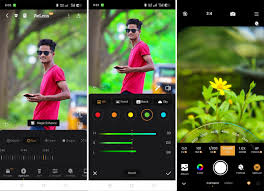
ReLens App Review: Make Your Phone Photos Look Professional
Have you ever wanted your phone to take pictures like a professional camera? Many people like taking photos, but not everyone can afford a big DSLR camera. That’s where ReLens comes in. ReLens is a mobile app that uses artificial intelligence to help your phone take sharper, brighter, and more detailed photos. It works on both Android and iOS devices, and it is easy to use even if you are new to photography.
In this post, I will explain what ReLens can do, how it works, and why it is helpful for anyone who enjoys taking photos.
What Is ReLens?
ReLens is a photo app that turns your phone camera into something closer to a DSLR. A DSLR camera has a large sensor and special lenses that help it take clear photos with smooth background blur. Phones usually do not have this level of control. ReLens uses artificial intelligence to create these effects digitally.
With ReLens, you can:
- Make the background blurry for a professional look
- Choose different blur shapes like hearts, stars, or circles
- Adjust settings like focus, brightness, and color
- Brighten dark photos
- Improve old or low-quality pictures
It is designed for anyone who wants to take better pictures without carrying a heavy camera.
Main Features of ReLens
1. Background Blur and Bokeh
One of the most popular features in ReLens is the bokeh effect. Bokeh means the soft blur behind the main subject of a photo. The app offers over 20 different shapes for the blur, such as hearts, stars, hexagons, and circles. You can control how strong the blur is and which parts of the image stay sharp. This makes your photos look more artistic and fun.
2. Manual Camera Controls
ReLens lets you adjust settings that most phones cannot change. You can control:
- ISO – how bright the photo is
- Shutter speed – how motion appears
- Focus – what part of the photo is sharp
- White balance – adjusts the color tone
- Exposure – overall light in the photo
These settings give you more freedom to take creative photos. For example, you can freeze a moving subject, make a picture brighter, or adjust colors to match the scene.
3. Portrait Tools
ReLens has special tools for portraits. You can smooth skin gently, brighten faces, and make eyes appear clearer. The app also keeps the subject sharp while softening the background, which makes portrait photos look clean and professional.
4. Filters and Styles
The app includes over 100 filters that change the look of your photos. You can choose warm tones, cool tones, black-and-white, or bright colors. You can also adjust shadows, highlights, and sharpness. These tools help you create a photo style that fits the scene.
5. Ultra-HD Restoration
Sometimes photos turn out blurry or low-quality. ReLens has a tool to improve these photos. It can fix small details, reduce noise, and brighten dark areas. This is helpful for old pictures or low-resolution photos from older phones.
6. Night Mode
Taking photos at night is difficult on phones. ReLens helps by brightening dark scenes, reducing grain, and keeping subjects sharp. It works well for night events, indoor photos, or outdoor evening shots.
7. Local Processing
ReLens performs many edits directly on your phone. This means your photos do not need to be uploaded to a server, which keeps them private and safe.
Where to Get ReLens
ReLens is available on Android and iOS devices. You can download it from the Google Play Store or the Apple App Store. Users say it is simple to use and helps create better photos than standard phone cameras.
ReLens vs. DSLR Cameras
Of course, ReLens cannot replace a real DSLR camera. DSLR cameras have larger sensors and interchangeable lenses. However, ReLens can make many phone photos look much closer to professional quality.
Here is a simple comparison:
| Feature | DSLR Camera | ReLens App |
|---|---|---|
| Sensor size | Large | Small |
| Blur | Natural | AI-generated |
| Lens options | Multiple lenses | Digital effects |
| Price | Expensive | Low cost |
| Weight | Heavy | Light (phone only) |
For everyday photos, social media, or school projects, ReLens gives results that are impressive for a phone.
What You Can Photograph With ReLens
ReLens works well for many types of photos:
- Portraits: Clean faces and soft backgrounds
- Pets: Capture quick movements with sharp focus
- Food: Make dishes stand out with blur backgrounds
- Plants and Flowers: Close-up shots look clear and bright
- Night Scenes: Brighten city lights or indoor photos
- School Projects: Take clear pictures for posters or reports
Tips for Taking Better Photos
Here are some simple tips to get the best results:
- Clean your camera lens before taking pictures.
- Hold your phone steady with both hands.
- Experiment with different blur shapes.
- Take multiple shots and choose the best one.
- Avoid over-editing; keep it natural.
ReLens vs. RE:Lens
Some people confuse ReLens with RE:Lens. They are different:
- ReLens: Mobile app for photography
- RE:Lens: Computer tool for video editing, like fixing fisheye or 360-degree videos
ReLens is for photos, not videos.

Should You Try ReLens?
Yes, if you like taking photos and want them to look cleaner and brighter. You do not need a professional camera, and the app is easy to use. ReLens is ideal for beginners, students, social media users, and anyone who wants better-looking photos from a phone.
Final Thoughts
ReLens is a simple but powerful app for making phone photos look professional. With blur effects, portrait tools, manual controls, night mode, and filters, it gives more control than a standard phone camera. If you want better photos without spending money on a DSLR, ReLens is a great choice.
About the Author




