Make Your Android Phone Look Like a Sci-Fi Movie with Lonmatrix Launcher
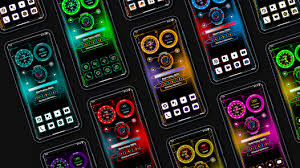
Do you want your Android phone to look futuristic and exciting? Lonmatrix Launcher, also called Ionmatrix Launcher, can completely change the way your home screen looks. With 3D icons, animated apps, and neon effects, this launcher makes your phone feel like it belongs in a sci-fi movie.
In this article, we will explain what Lonmatrix Launcher is, its main features, why people like it, and how you can use it to make your phone look amazing.
What is Lonmatrix Launcher?
Lonmatrix Launcher is an app for Android phones that changes the home screen. It adds futuristic designs, animations, and effects that make your phone look modern and high-tech.
This launcher was released in October 2025 by Expert Mistry and developed by lwsoftipl Apps. It works well on both old and new phones. It uses very little battery and is easy to set up, making it ideal for anyone who wants a unique phone design.
If you enjoy sci-fi movies or want a home screen that looks different from usual, this launcher is perfect. Fans of Tron or Iron Man will especially like it because it resembles the futuristic screens in those movies.
Main Features of Lonmatrix Launcher
Lonmatrix Launcher comes with several features that make it stand out from other launchers. Here are the most important ones:
1. 3D Holographic Designs
Your icons and widgets can appear in 3D, giving the impression that they are floating. This makes your home screen look alive and modern.
2. Animated Icons
Apps can move or shine, making your home screen interactive and fun to use.
3. Neon and Cybergrid Effects
The launcher includes neon lights and cyber-style transitions. When you open an app or swipe between screens, glowing lines and animations appear, giving a futuristic feel.
4. Customization Options
You can change icon sizes, grid layouts, colors, and animations. This allows you to make your phone look exactly the way you want.
5. Live Widgets
You can add widgets to show battery, CPU, memory, or weather. This helps you see important information without opening apps.
6. Smooth Performance
Despite its many effects, Lonmatrix Launcher is lightweight. It runs fast and does not slow down your phone.
7. Extra Tools
Some additional tools include:
- App drawer animations
- Battery saver
- Smart search
- Hide apps
- Night mode
- Pre-made themes
These features make your phone easier to use and more fun to look at.
Why People Like Lonmatrix Launcher
People enjoy Lonmatrix Launcher for several reasons:
- It makes your phone look futuristic and different.
- It works smoothly on almost any Android phone.
- It does not use too much battery.
- It is easy to set up.
- You can hide apps and organize your home screen better.
It has a rating of 4.2–4.4 stars and has been downloaded by more than 10,000 users. Many people who like sci-fi movies, technology, or creative phone designs find it enjoyable.
How to Install Lonmatrix Launcher
Installing the launcher is simple:
- Open the Google Play Store on your Android phone.
- Search for Lonmatrix Launcher or Ionmatrix Launcher.
- Tap Install.
- Open the app and follow the steps to set it as your default launcher.
After that, your phone will have 3D icons, animated apps, and a futuristic home screen.
Tips to Make the Most of Lonmatrix Launcher
Here are a few tips to enjoy the launcher fully:
- Try different themes: The app comes with many ready-made themes. You can switch between them to see what looks best.
- Use widgets: Adding battery, weather, or memory widgets helps you access information quickly.
- Adjust animations: You can make animations faster or slower depending on what feels smooth for your phone.
- Use night mode: Night mode reduces eye strain and gives your home screen a cool look at night.

How Lonmatrix Launcher Stands Out
Many Android launchers are available, but Lonmatrix Launcher is different because:
- Futuristic look: It gives your phone a sci-fi style unlike most simple launchers.
- Fast performance: Even with many effects, it runs smoothly.
- Custom options: You can change icons, layouts, colors, and animations easily.
- Extra tools included: Battery saver, smart search, live widgets, and hidden apps make it more useful.
Other launchers may not have 3D icons or neon animations, making this one special.
Who Should Use Lonmatrix Launcher?
This launcher is perfect for:
- Sci-fi fans: People who enjoy movies or games with futuristic screens.
- Teens and young adults: Anyone who wants a fun, colorful, and unique phone screen.
- Technology lovers: People who like changing the look of their phones.
- Gamers: It gives your phone a style similar to video game interfaces.
Even older phones can run this launcher without slowing down.
Final Thoughts
If you want a fun and futuristic phone screen, Lonmatrix Launcher is one of the best Android launchers to try. It offers 3D icons, animated apps, neon lights, and live widgets
About the Author




