
Zipper Lock Screen: A Fun Way to Open Your Phone
Are you bored of the usual way to open your phone? Swiping or typing a PIN can feel ordinary. There is a fun way called Zipper Lock Screen. This app lets you “unzip” your phone screen, just like a zipper on a jacket. It makes opening your phone more enjoyable and lets you change how your lock screen looks. In this article, we will explain what zipper lock screens are, how they work, their main features, popular apps, and some tips to use them safely.
What is a Zipper Lock Screen?
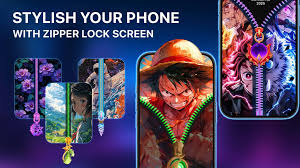
A Zipper Lock Screen is an app that changes how you open your phone. Instead of swiping or entering a PIN, you drag a zipper on the screen to open your phone. It is fun and interactive.
Most zipper lock screen apps are for Android devices, but a few also work on iPhones. Some apps come with live wallpapers or special effects, making your phone look different every time you open it.
Imagine opening your phone by unzipping a jacket or a backpack. It may sound simple, but it adds a little fun to an everyday task.
How Zipper Lock Screens Work
Zipper lock screen apps are easy to set up. Here’s how it works:
- Download the app from your app store.
- Open the app and choose your zipper style. You can pick from metallic, neon, rainbow, or heart-shaped zippers.
- Select a background. You can use your own photos, preloaded themes, or live wallpapers.
- Add effects. Some apps play sounds or vibrate when you drag the zipper.
- Set a PIN or password if you want extra safety.
Once set up, your lock screen will look different. Some apps even let you add small widgets like time, date, or battery level, so you can see information without opening your phone fully.
Main Features of Zipper Lock Screen Apps
Zipper lock screen apps have several fun and useful features. Here are the most common:
- Interactive Zipper
The zipper moves realistically when you drag it, and some apps include smooth or special effects. - Different Zipper Styles and Colors
You can pick from a variety of zippers in different shapes and colors. - Custom Backgrounds
You can set your own photos or choose from themes like cartoons, anime, cars, nature, or neon designs. - Sound and Vibration
Some apps play a sound or vibration when you unzip. You can also turn these off. - PIN or Password Lock
You can add a PIN or password before unzipping for extra protection. - Lock Screen Widgets
Widgets can show the time, date, battery, or weather, so you get information at a glance. - Preview Mode
You can see how your zipper and wallpaper will look before applying them. - HD or 4K Wallpapers
Some apps, especially for iPhones, offer high-resolution wallpapers for a sharper look.
Popular Zipper Lock Screen Apps
Here are some popular options:
- Zipper Lock Screen (Uptodown)
A simple app with smooth zipper animations and wallpaper customization. - Zip Locker (Softonic)
Lets you set a password before unzipping. It also has many zipper styles and themes. - Zipper Lock Wallpapers Screen
Focuses on realistic zippers and can play small melodies. Themes include nature or cartoons. - Zipper Lock Screen & Wallpaper
Comes with special wallpapers and allows custom tabs like hearts or stars. - Zipper Lock Screen 4K (iOS)
An iPhone app with sharp 4K wallpapers and designs.
Why People Like Zipper Lock Screens
Zipper lock screens are popular because they are fun and useful:
- Fun Experience
Dragging a zipper is more enjoyable than swiping or typing a PIN. - Personal Style
You can change wallpapers, colors, and animations to make your phone look different. - Extra Safety
Adding a PIN or password gives your phone an extra layer of protection. - Quick Information
Widgets can show time, date, or battery without opening the phone. - Cool Animations
Smooth and special effects make your phone look attractive every time you open it.
Tips for Choosing a Zipper Lock Screen App
Here are some tips to choose the right app:
- Check Your Phone: Make sure the app works on your device.
- Read Reviews: Apps with good ratings are usually safer and more stable.
- Check Permissions: Only give permissions the app needs, like storage access.
- Look for Custom Options: Choose apps that let you change zipper styles, colors, and wallpapers.
- Use Preview Mode: Test the zipper and wallpaper before applying them.
Are Zipper Lock Screens Safe?
Yes, they are safe if downloaded from trusted stores. Avoid unknown websites, as they might have viruses.
Also, check app permissions carefully. A lock screen app should not need access to contacts or messages, so do not give extra permissions.
How to Set Up a Zipper Lock Screen
Here is a simple setup guide:
- Download the app from your app store.
- Open the app and allow the permissions it asks for.
- Pick your favorite zipper style.
- Choose a background image or wallpaper.
- Add sound or vibration effects if you want.
- Set a PIN or password for extra safety.
- Preview your lock screen to see how it looks.
- Apply the lock screen, and your phone will open by dragging the zipper every time.
Fun Zipper Lock Screen Themes
You can make your phone look really cool with different themes:
- Anime – Popular anime characters or shows.
- Nature – Beaches, mountains, forests, sunsets.
- Cartoons – Fun cartoon characters.
- Cars and Sports – Racing cars or sports logos.
- Neon and Glow – Bright colors and glowing effects.
- Cute and Hearts – Hearts, stars, and cute animals.
You can also use your own photos for a personal touch.
Final Thoughts
A Zipper Lock Screen is a fun way to open your phone. It lets you change your phone’s look, enjoy animations, and add extra safety. With many zipper styles, wallpapers, and themes, your phone can look unique and fun every day.
About the Author




